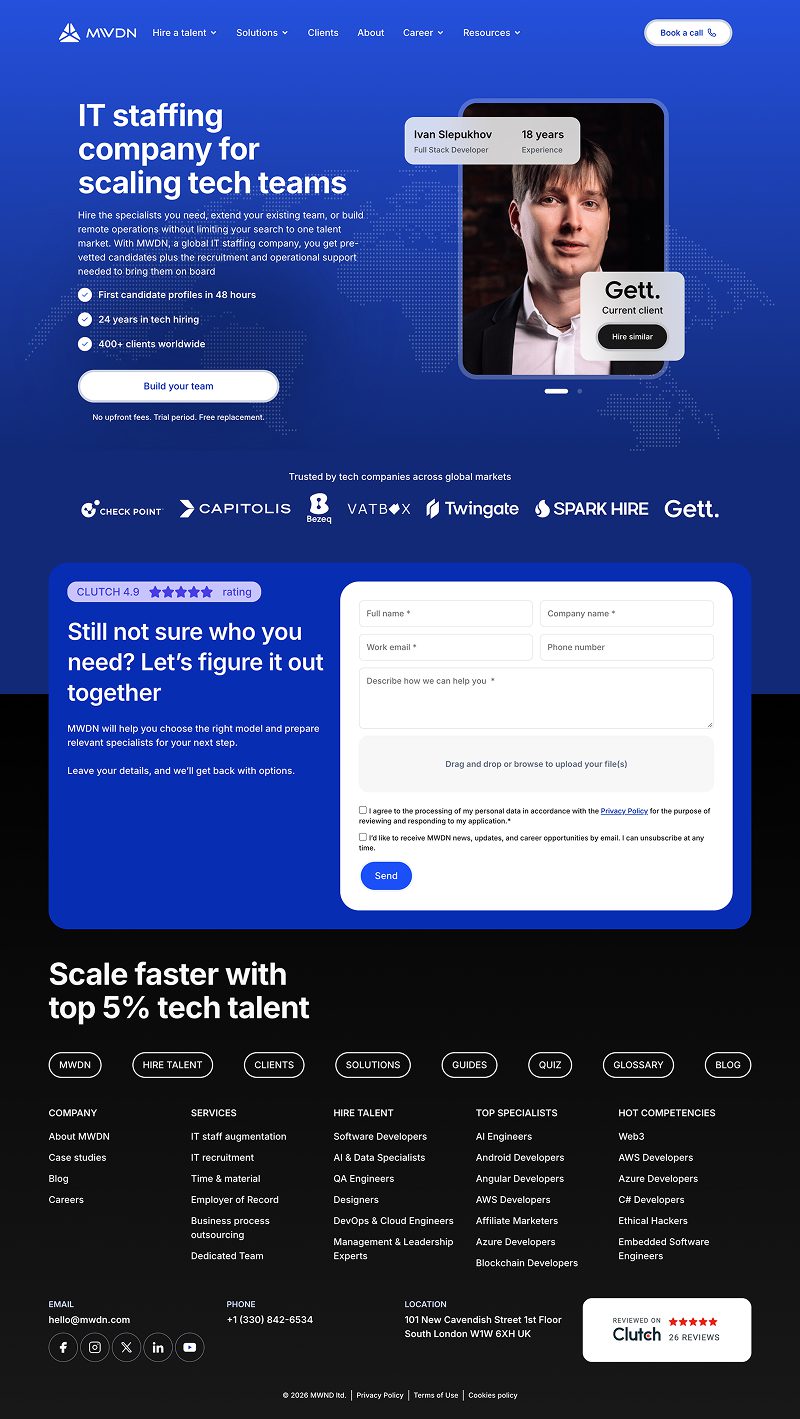
MWDN is an international B2B company in the IT staffing sector that helps tech businesses find specialists and build teams. For these companies, a corporate website is not just a showcase of services, but a crucial part of their first interaction with a potential partner.
As part of the project, work was carried out on redesigning specific interfaces, improving the user experience, and optimizing the website's performance. The main focus was on the details that affect how easily visitors can interact with the site.
A corporate website should help customers make decisions
In the B2B sector, decisions to collaborate are rarely made on the spot. Before reaching out to a company, a potential client familiarizes themselves with its services, assesses its expertise, reviews examples of its work, and looks for evidence of its reliability.
The purpose of a high-quality interface is to avoid creating additional obstacles along the way. Navigation, information architecture, interactive elements, and loading speed must work together as a single system.
Not just a new look, but intuitive interaction
A visual redesign makes sense when it helps users navigate the page more quickly. This applies not only to colors and typography, but also to the layout of elements, their behavior, and the visual hierarchy.
A good interface doesn't force visitors to figure out how the site works. It helps them focus on their own task.
That is precisely why, when working, it is important to take into account not only that, What does the element look like?, but also the fact that, how he behaves in different situations.
Updates to Interfaces and Interactive Elements
A separate part of the project involved working with the components that visitors interact with directly. Cards, forms, modal windows, and dynamic content all require consistent behavior.
Cards and Dynamic Content
Interactive cards allow you to display more information without cluttering the page with large blocks of text. However, their behavior must remain intuitive on both computers and touchscreen devices.
When working with these components, attention was focused on:
- Intuitive navigation between elements.
- Smoothness of animations and transitions.
- Proper operation on mobile devices.
- Consistency of visual elements with the website's design.
- Accessibility of controls for different interaction methods.
Forms and Scenarios for Making a Request
A feedback form is one of the points where a potential customer’s interest can turn into a concrete inquiry. It’s important to avoid unnecessary steps and ambiguous behavior here.
What was the focus of attention?
- A clear beginning. Visitors should understand what steps they need to take to contact the company.
- Expected interaction. Opening, filling out, and closing the form should not be difficult.
- Accessibility. Controls must be usable via the keyboard, and the focus state must be clearly indicated.
- Adaptability. The form should remain user-friendly on different screen sizes.
It is important to distinguish between technically correct implementation and proven increase in conversion rates. The first can be verified directly; the second requires analysis and a sufficient amount of data.
What Interaction Looks Like in Motion
A static screenshot doesn't always allow you to assess how the interface behaves. Animations, transitions, scrolling, and responses to user actions are best demonstrated in a video.
The demo video below is from another project—it's just to show how video content will appear within the article.
Load Speed as Part of the User Experience
Even a visually appealing website may not load quickly enough. Large images, third-party scripts, excessive styles, and complex interactive components can all affect page load speed.
As part of the work on MWDN, special attention was paid to the technical optimization of the website. This involves improving the performance of the resources required to load and display pages.
What's Important to Monitor
| Field | What We Check | Practical Value |
|---|---|---|
| Loading | CSS, JavaScript, and other resources | Fewer delays when loading pages |
| Interactivity | How the interface responds to user actions | More intuitive interaction with elements |
| Stability | How the mockup behaves during loading | Fewer unwanted content shifts |
| Adaptability | Works on various devices | A Consistent Experience for Visitors |
The following metrics can be used to evaluate performance Core Web Vitals, in particular LCP, INP and CLS.
Note: Specific values for the metrics before and after optimization are not provided here, as they require verified measurements.
How do businesses benefit from these improvements?
Working on a corporate website does not necessarily require a complete redesign. In many cases, an existing website can be developed incrementally by improving individual components and user interaction scenarios.
For businesses, this creates several opportunities:
- A more convenient way to interact with services. It's easier for visitors to navigate the interface.
- Fewer technical obstacles. The website can run faster and more reliably.
- A more consistent presentation of the company. Visual and interactive elements support a holistic perception of the brand.
- The potential for gradual development. Individual components can be improved without completely overhauling the resource.
You can improve the website gradually
The MWDN example illustrates one approach to developing an existing corporate resource: working on specific components, their behavior, and their technical foundation.
This approach allows us to focus on tasks that are practically important to users and not reduce the redesign to merely changing the appearance.
Additional Elements for Checking Typography
This section is intended solely for testing editor styles. You can delete it before publishing.
Highlighting within a paragraph
This is an example bold text, italics, bold italics, the highlighted section, strikethrough text and highlighted text.
The following is used here inline-code, the superscript in the entry x2, the subscript in CO2 and brief explanatory text.
Nested list
- Design
- Typography
- Composition
- Adaptive States
- Development
- Interactive Components
- Optimization
Preformatted text
PROJECT: MWDN
TYPE: B2B / IT Staffing
WORK: UX/UI, Redesign, Performance
STATUS: Case Study Demo
An example of a center-aligned paragraph.
An example of a right-aligned paragraph.
Additional link: Revise the approach to developing business websites.